
Minimal Concentric Watch Face
Native Wear OS Watch Face Format (WFF), Concentric Dial Geometry & Ultra-Low AMOLED AOD
Minimal Concentric Watch Face (com.watchcare.digibee.in) brings modern horological geometry to Wear OS smartwatches (Pixel Watch, Galaxy Watch, OnePlus Watch, and Wear OS 4/5+ devices). Engineered using Google's declarative Watch Face Format (WFF) and matte-obsidian AMOLED optimization, rotating concentric rings track minutes and seconds around a high-contrast index pill while keeping Always-On Display battery drain near zero.
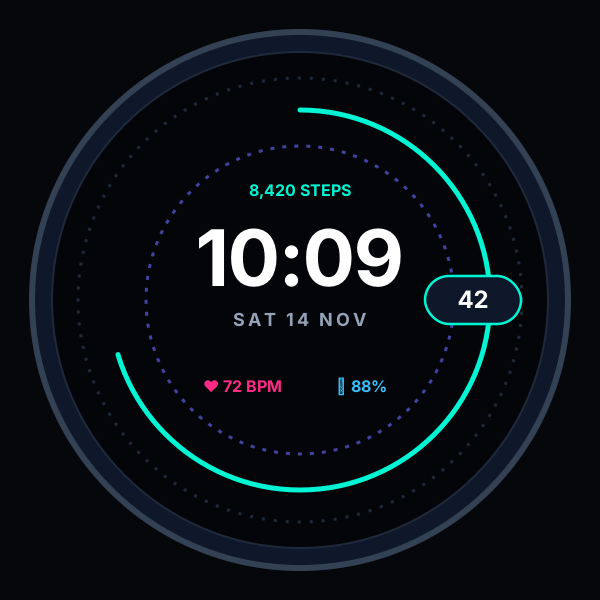
Concentric Rotating Track & Index Pill
Precision outer second and inner minute concentric rings aligned to a high-contrast active focus capsule.
Core Features & Functionality
Thoughtfully engineered in Kotlin & Jetpack Compose with strict local-first performance.
Native Google Watch Face Format (WFF)
Rendered directly by the Wear OS system compositor for silky 60fps dial rotation and minimal CPU wakeups.
Concentric Horological Geometry
Inspired by classic mechanical concentric regulator watches—combining digital legibility with tactile radial motion.
True Black AMOLED Always-On Mode
Ambient mode shifts automatically to hollow stroke typography on pure OLED black (<3% pixel ratio) to maximize watch battery life.
Customizable Complication Slots
Bind your favorite Wear OS data providers—Steps, Heart Rate, Watch Battery, UV Index, World Clock, or Next Event.
Curated Accent Color Palettes
Switch effortlessly between Cyber Cyan, Indigo Pulse, Emerald Mint, Monochrome Slate, and Crimson Sport accents.
Zero Cloud Health Harvesting
Complication and sensor values are rendered strictly on your wrist—Digibee never collects or uploads biometric or watch data.
How to Use Watch Face
Get started in seconds with zero account registration or complex setup.
Install on Your Wear OS Smartwatch
Open the Google Play link on your phone or smartwatch and select your paired Wear OS watch from the 'Install on more devices' dropdown.
Long-Press Your Current Watch Face
Once installed, touch and hold your watch display, swipe to 'Add new watch face', and select Minimal Concentric Watch Face.
Customize Dial Accents & Complications
Tap 'Customize' on your watch or inside your phone's Watch companion app (Pixel Watch / Galaxy Wearable) to pick accent colors and complication slots.
Enjoy Effortless Ambient AOD
Lower your wrist to let Wear OS transition smoothly into the ultra-low-power Always-On outline dial.
Built on Strict Local-First Privacy
Every Digibee app ships with a transparent, standalone Privacy Policy and Terms of Service compliant with Google Play Data Safety and Google API Limited Use standards.
Frequently Asked Questions
Everything you need to know about Minimal Concentric Watch Face.
More Official Apps by Digibee
Explore our complete Google Play portfolio and 33+ free browser utilities at digibee.in/tools.
Pocket Play: 4K Video Player
Private offline-first & cloud 4K HDR video player for Android Phone, Tablet, and Android TV. Powered by Media3 ExoPlayer with 60fps motion smoothing, read-only Google Drive video streaming, and zero-internet Wi-Fi Quick Share.
Battery Care - Smart Health
Extend your smartphone's Lithium-Ion battery lifespan by up to 3X. Real-time charge & drain velocity (+%/hr), spoken voice milestone alerts, 7-day timeline analytics, 20+ large accessible widgets, and 100% offline privacy.
ArrowFlow: Arrow Escape Puzzle
Untangle interlocking directional arrows and clear intricate silhouette grids at silky 60fps! Features infinite progressive stages, 5 studio themes, pinch-to-zoom precision, friend challenge cards, and offline play.