
Battery Care - Smart Health
Intelligent 20%–80% Charging Habits, Spoken Voice Alerts & Li-Ion Telemetry
Battery Care - Smart Health (com.batterycare.digibee.in) is an ultra-lightweight, 100% offline Android battery intelligence utility crafted by Digibee. Built without internet permissions or background trackers, it monitors real-time charging velocity (+%/hr), active drain rate, millivolt stress, and battery temperature—delivering hands-free spoken voice announcements at 80% and 100% milestones plus 20+ high-contrast home screen widgets.
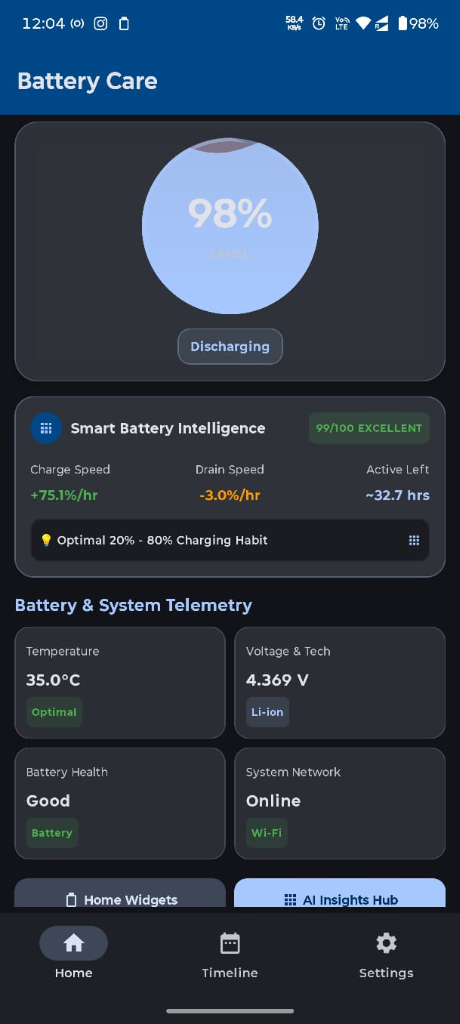
Smart Telemetry & Live Battery Health
Real-time charge speed (+%/hr), discharge rate (-%/hr), Li-ion voltage (V), and thermal health (°C).
Core Features & Functionality
Thoughtfully engineered in Kotlin & Jetpack Compose with strict local-first performance.
Live Charge & Drain Velocity (+%/hr)
Measures exact real-time energy flow in percentage per hour, millivolts, and Celsius to benchmark fast chargers and spot faulty cables.
20%–80% Lithium-Ion Longevity Science
Prevents high-voltage cathode oxidation above 80% and deep-discharge stress below 20%, extending battery life from ~500 to 1,500+ cycles.
Hands-Free Spoken Voice Milestones
Clear male/female audio packs & native TTS announce charger plug-in and 80% / 100% milestones—auto-muting during active phone or VoIP calls.
Hourly Timeline & 7-Day Logs
Review granular charging sessions, duration, percentage gained, and hourly drain history stored strictly in your local on-device Room database.
20+ High-Contrast & Elder-Friendly Widgets
Add 1×1 quick tiles, 2×2 circular rings, 4×2 Health Dials, Family Dashboards, and optional one-tap Screen Lock widgets to your launcher.
Air-Gapped Offline Privacy
Engineered without internet data collection, user accounts, or analytics SDKs. Consumes <0.1% background battery via lightweight broadcast events.
How to Use Battery Care
Get started in seconds with zero account registration or complex setup.
Install & Enable Notification Alerts
Install Battery Care from Google Play and allow notification permission so real-time charging telemetry and milestone alerts can run reliably.
Configure Your 80% Healthy Unplug Alert
Open Voice & Alert Settings to pick your preferred milestone (such as 80%) and test the spoken voice volume slider.
Schedule Night Quiet Hours (DND)
Set your sleep window so spoken voice announcements stay completely silent overnight while logging continues quietly.
Pin Live Widgets & Check Charger Speeds
Long-press your Android home screen to add Battery Care widgets, and check the Timeline tab anytime to verify fast-charging adapter speeds.
Built on Strict Local-First Privacy
Every Digibee app ships with a transparent, standalone Privacy Policy and Terms of Service compliant with Google Play Data Safety and Google API Limited Use standards.
Frequently Asked Questions
Everything you need to know about Battery Care - Smart Health.
More Official Apps by Digibee
Explore our complete Google Play portfolio and 33+ free browser utilities at digibee.in/tools.

Pocket Play: 4K Video Player
Private offline-first & cloud 4K HDR video player for Android Phone, Tablet, and Android TV. Powered by Media3 ExoPlayer with 60fps motion smoothing, read-only Google Drive video streaming, and zero-internet Wi-Fi Quick Share.
Minimal Concentric Watch Face
Precision concentric dial smartwatch face engineered for Wear OS by Google. Features native declarative Watch Face Format (WFF) rendering, ultra-low pixel-lit Always-On Display (AOD), crisp glanceable typography, and customizable health complications.
ArrowFlow: Arrow Escape Puzzle
Untangle interlocking directional arrows and clear intricate silhouette grids at silky 60fps! Features infinite progressive stages, 5 studio themes, pinch-to-zoom precision, friend challenge cards, and offline play.